> For the complete documentation index, see [llms.txt](https://docs.zbrain.ai/llms.txt). Markdown versions of documentation pages are available by appending `.md` to page URLs; this page is available as [Markdown](https://docs.zbrain.ai/zbrain-documentation/zbrain-zsearch/enterprise-context-set-up-in-zsearch/uploading-files-to-build-a-knowledge-base.md).
# Uploading files to build a knowledge base
In addition to connecting enterprise systems through connectors, ZBrain Builder allows administrators to upload files directly to build a knowledge base. File uploads provide a quick and flexible way to onboard content for evaluation, targeted use cases, or controlled datasets.
Uploaded files follow the same ingestion, indexing, and permission-enforcement process as connector-based data, ensuring a consistent search experience in ZSearch.
#### When to use file uploads
Uploading files is especially useful when:
* Evaluating ZSearch without connecting live enterprise systems
* Creating a knowledge base for a specific project or use case
* Working with documents that are not available through supported connectors
File uploads enable teams to quickly make content searchable while maintaining enterprise-grade indexing and retrieval.
#### Uploading files in ZBrain Builder
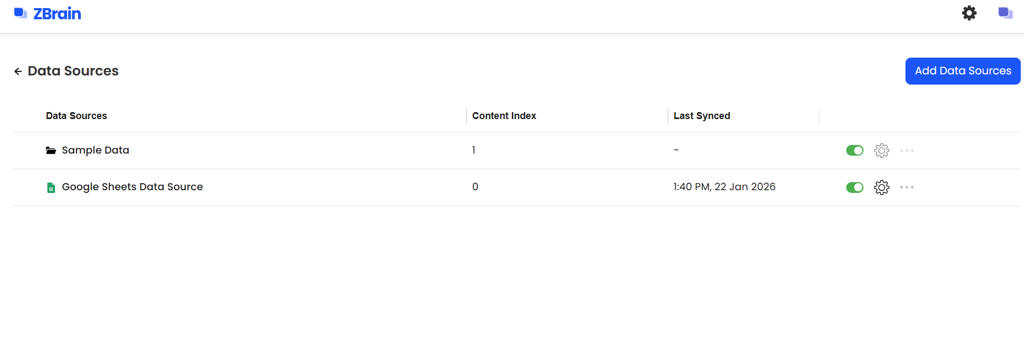
Files are uploaded from the **Data Sources** section in ZBrain Builder. To upload a file -
* Go to **Data Sources** in ZBrain and click on **Sample Data.**
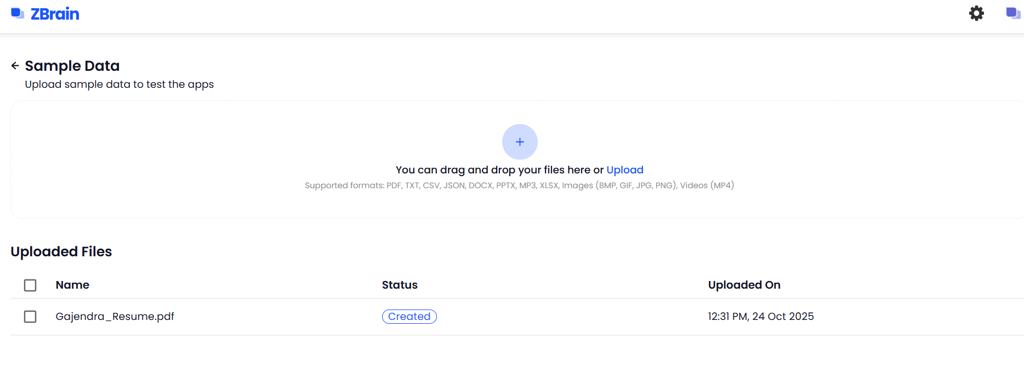
* This will redirect you to the Sample Data page from where you can upload the required file/files.
* Click ‘Upload’ or '+' icon to upload the file/files
During upload:
* Administrators select one or more files to upload
* Supported file types are ingested and processed automatically
* A dedicated knowledge base is created for the uploaded file set
Each upload is treated as a managed data source, just like a connector-based source.
#### Knowledge base creation for uploaded files
When files are uploaded, ZBrain Builder automatically creates a knowledge base to store and index the content.
Key behaviors include:
* One knowledge base is created per file upload set
* All uploaded files are indexed into the same knowledge base
* The knowledge base is immediately available to ZSearch once indexing is complete
This ensures uploaded content can be searched, filtered, and used in projects alongside connector-based data.
You can check the status on the Sample Data page to see if indexing is complete.
#### Indexing and processing behavior
Uploaded files undergo the same processing pipeline as connected data sources:
* File content is extracted and analyzed
* Metadata such as file name, type, and upload time is captured
* Embeddings are generated for the full document content
* Files are indexed and made searchable
Indexing runs asynchronously. File status indicators show whether content is pending, in progress, indexed, or has encountered an error.

#### Permissions and access control
By default, access to uploaded files is controlled at the tenant level. Only users with access to the tenant can view and use the uploaded content in ZSearch.
Once indexed:
* Uploaded files respect tenant-level access boundaries
* Content is available for search and project creation
* AI-generated responses are grounded strictly in the uploaded files
Permission enforcement remains consistent across search and collaboration workflows.
#### Using uploaded content in ZSearch
After indexing is complete, uploaded files become part of the enterprise context used by ZSearch. Users can:
* Search across uploaded documents using keywords or natural language
* Filter results by data source or file type
* Group uploaded files into projects for focused collaboration
* Query project-specific AI chat grounded in the uploaded content
Uploaded content behaves identically to connector-based content from a search-and-retrieval perspective.
---
# Agent Instructions
This documentation is published with GitBook. GitBook is the documentation platform designed so that both humans and AI agents can read, navigate, and reason over technical content effectively. Learn more at gitbook.com.
## Querying This Documentation
If you need additional information that is not directly available in this page, you can query the documentation dynamically by asking a question.
Perform an HTTP GET request on the current page URL with the `ask` query parameter, and the optional `goal` query parameter:
```
GET https://docs.zbrain.ai/zbrain-documentation/zbrain-zsearch/enterprise-context-set-up-in-zsearch/uploading-files-to-build-a-knowledge-base.md?ask=&goal=
```
`ask` is the immediate question: it should be specific, self-contained, and written in natural language.
`goal` is optional and describes the broader end goal you are ultimately trying to accomplish on behalf of the user. GitBook uses it to tailor the answer towards what is most useful for that goal.
The response will contain a direct answer to the question and relevant excerpts and sources from the documentation.
Use this mechanism when the answer is not explicitly present in the current page, you need clarification or additional context, or you want to retrieve related documentation sections.