> For the complete documentation index, see [llms.txt](https://docs.zbrain.ai/llms.txt). Markdown versions of documentation pages are available by appending `.md` to page URLs; this page is available as [Markdown](https://docs.zbrain.ai/zbrain-documentation/zbrain-zsearch/enterprise-context-set-up-in-zsearch/how-indexing-works-for-search.md).
# How indexing works for search
Indexing is the process that makes enterprise content searchable in ZSearch. Once data sources are connected or files are uploaded in ZBrain Builder, ZSearch automatically processes and indexes the content so it can be retrieved quickly, accurately, and securely during search.
Indexing runs in the background and requires no manual intervention once configured.
#### What happens during indexing
When indexing begins, ZSearch performs a series of coordinated steps for each file or document:
* Content is extracted from supported file types
* Text and structural information are analyzed
* Relevant metadata, such as file name, source, type, and timestamps is captured
* Semantic representations are generated for the full document
* The processed content is stored in the configured search index
This process ensures that both exact keyword matches and contextual, meaning-based queries are supported during search.
#### Full-document indexing
ZSearch indexes documents at the file level, not as isolated text fragments. Each indexed item represents a complete document, preserving its overall context and meaning.
This approach enables:
* More reliable relevance ranking
* Clear document-level search results
* Accurate grouping of documents into projects
Search results always reference the original source document.
#### Indexing status and visibility
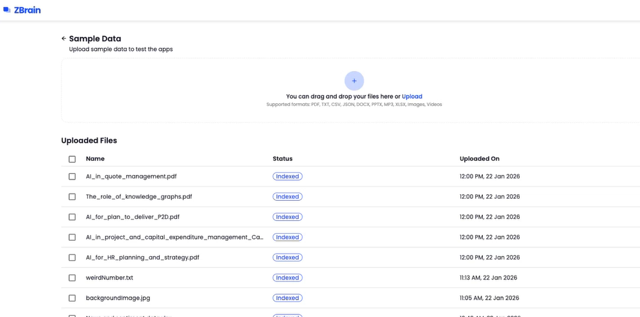
Indexing is asynchronous and occurs independently for each file. ZBrain Builder displays indexing status so administrators can monitor progress.
Common indexing states include:
* **Pending** – The file is queued for processing
* **In Progress** – The file is currently being indexed
* **Indexed** – The file is fully processed and searchable
* **Error** – Indexing failed and requires attention
Only files marked as **Indexed** are available in ZSearch.
#### Permission-aware indexing
During indexing, ZSearch also captures permission metadata from the source system.
This ensures that:
* Access controls from the original data source are preserved
* Users only see documents they are authorized to access
* Search results and AI-generated answers remain permission-aware
Permissions are enforced at query time, not duplicated or overridden during indexing.
#### Index freshness and updates
Indexing is not a one-time operation. ZSearch continuously monitors connected data sources for changes.
When new or updated content is detected:
* The affected files are re-indexed automatically
* Search results are updated to reflect the latest content
* No manual reindexing is required
This ensures that ZSearch always operates on current enterprise knowledge.
#### How indexed content is used in Search
Once indexed, content becomes immediately available for:
* Keyword and natural language search
* Filtering by data source, type, or recency
* Inclusion in collaborative project workspaces
* AI-assisted querying grounded in indexed documents
Indexing is the foundation that enables accurate retrieval, relevance ranking, and secure collaboration in ZSearch.
After understanding how indexing works, the next step is to learn how ZSearch keeps indexed content up to date over time.
The next section covers:
* **Syncing and updating a knowledge base**
---
# Agent Instructions
This documentation is published with GitBook. GitBook is the documentation platform designed so that both humans and AI agents can read, navigate, and reason over technical content effectively. Learn more at gitbook.com.
## Querying This Documentation
If you need additional information that is not directly available in this page, you can query the documentation dynamically by asking a question.
Perform an HTTP GET request on the current page URL with the `ask` query parameter, and the optional `goal` query parameter:
```
GET https://docs.zbrain.ai/zbrain-documentation/zbrain-zsearch/enterprise-context-set-up-in-zsearch/how-indexing-works-for-search.md?ask=&goal=
```
`ask` is the immediate question: it should be specific, self-contained, and written in natural language.
`goal` is optional and describes the broader end goal you are ultimately trying to accomplish on behalf of the user. GitBook uses it to tailor the answer towards what is most useful for that goal.
The response will contain a direct answer to the question and relevant excerpts and sources from the documentation.
Use this mechanism when the answer is not explicitly present in the current page, you need clarification or additional context, or you want to retrieve related documentation sections.